History Source of this version Current version
| 1 | --- | |
| 2 | title: Platform components | |
| 3 | tags: [Writing] | |
| 4 | --- | |
| 5 | | |
| 6 | These components come with every wiki. Each one below is shown working, with the Forge Markdown that makes it underneath. Each wiki's **Components** page has them too, next to the wiki's own. | |
| 7 | | |
| 8 | ## Notice | |
| 9 | | |
| 10 | A box the reader shouldn't miss: context, warnings, dangers. | |
| 11 | | |
| 12 | :::notice[Balance changes]{warning icon} | |
| 13 | Values change between seasons. | |
| 14 | ::: | |
| 15 | | |
| 16 | ```forge | |
| 17 | :::notice[Balance changes]{warning icon} | |
| 18 | Values change between seasons. | |
| 19 | ::: | |
| 20 | ``` | |
| 21 | | |
| 22 | `warning` and `danger` change the colour; `icon` adds an icon; `bold` makes the text stand out. Without a colour it's an information box. | |
| 23 | | |
| 24 | ## Spoiler | |
| 25 | | |
| 26 | Hidden until the reader opens it. As a block: | |
| 27 | | |
| 28 | :::spoiler[Season 6 ending] | |
| 29 | The hidden part of the story goes here. | |
| 30 | ::: | |
| 31 | | |
| 32 | ```forge | |
| 33 | :::spoiler[Season 6 ending] | |
| 34 | The hidden part of the story goes here. | |
| 35 | ::: | |
| 36 | ``` | |
| 37 | | |
| 38 | Or inside a sentence, with one colon: the final boss is :spoiler[the narrator all along]. | |
| 39 | | |
| 40 | ```forge | |
| 41 | The final boss is :spoiler[the narrator all along]. | |
| 42 | ``` | |
| 43 | | |
| 44 | ## Tabs | |
| 45 | | |
| 46 | Alternatives side by side, like platforms or game modes. | |
| 47 | | |
| 48 | ::::tabs | |
| 49 | :::tab[Battle Royale] | |
| 50 | Squads of three, last team standing wins. | |
| 51 | ::: | |
| 52 | :::tab[Mixtape] | |
| 53 | Rotating arena and objective modes. | |
| 54 | ::: | |
| 55 | :::: | |
| 56 | | |
| 57 | ```forge | |
| 58 | ::::tabs | |
| 59 | :::tab[Battle Royale] | |
| 60 | Squads of three, last team standing wins. | |
| 61 | ::: | |
| 62 | :::tab[Mixtape] | |
| 63 | Rotating arena and objective modes. | |
| 64 | ::: | |
| 65 | :::: | |
| 66 | ``` | |
| 67 | | |
| 68 | Each panel is its own `:::tab`, and the outer fence gets an extra colon so the two don't get mixed up. | |
| 69 | | |
| 70 | ## Infobox | |
| 71 | | |
| 72 | Key facts beside the article, as a list of `Label: value` lines. | |
| 73 | | |
| 74 | :::infobox[Dovetail joint] | |
| 75 | - Family: Corner joint | |
| 76 | - Slope: 1:6 to 1:8 | |
| 77 | - Strength: Mechanical lock | |
| 78 | ::: | |
| 79 | | |
| 80 | ```forge | |
| 81 | :::infobox[Dovetail joint] | |
| 82 | - Family: Corner joint | |
| 83 | - Slope: 1:6 to 1:8 | |
| 84 | - Strength: Mechanical lock | |
| 85 | ::: | |
| 86 | ``` | |
| 87 | | |
| 88 | Most wikis soon make their own infoboxes, with a picture and exactly the fields they need: see [[Writing components]]. | |
| 89 | | |
| 90 | ## Table | |
| 91 | | |
| 92 | A table written as CSV (commas between cells), pasted straight from a spreadsheet, or as YAML. Number columns line up on the right. | |
| 93 | | |
| 94 | :::table[Legends by class]{sortable} | |
| 95 | Name, Class, Released | |
| 96 | Gibraltar, Support, Season 0 | |
| 97 | Wattson, Controller, Season 2 | |
| 98 | Rampart, Controller, Season 6 | |
| 99 | ::: | |
| 100 | | |
| 101 | ```forge | |
| 102 | :::table[Legends by class]{sortable} | |
| 103 | Name, Class, Released | |
| 104 | Gibraltar, Support, Season 0 | |
| 105 | Wattson, Controller, Season 2 | |
| 106 | Rampart, Controller, Season 6 | |
| 107 | ::: | |
| 108 | ``` | |
| 109 | | |
| 110 | - `{sortable}` turns the column headings into sort buttons (try it above). | |
| 111 | - `{collapsed}` hides the table under its caption until it's opened. | |
| 112 | - A cell that's just `<` joins the cell on its left, and `^` the cell above, for merged cells. | |
| 113 | | |
| 114 | Ordinary Markdown tables work too, if you prefer them: | |
| 115 | | |
| 116 | | Name | Class | | |
| 117 | | --- | --- | | |
| 118 | | Gibraltar | Support | | |
| 119 | | Rampart | Controller | | |
| 120 | | |
| 121 | ```forge | |
| 122 | | Name | Class | | |
| 123 | | --- | --- | | |
| 124 | | Gibraltar | Support | | |
| 125 | | Rampart | Controller | | |
| 126 | ``` | |
| 127 | | |
| 128 | ## Quote | |
| 129 | | |
| 130 | A quotation, with who said it and where. | |
| 131 | | |
| 132 | :::quote[Who said it]{source="Where they said it"} | |
| 133 | The quoted words go here. | |
| 134 | ::: | |
| 135 | | |
| 136 | ```forge | |
| 137 | :::quote[Who said it]{source="Where they said it"} | |
| 138 | The quoted words go here. | |
| 139 | ::: | |
| 140 | ``` | |
| 141 | | |
| 142 | ## Gallery | |
| 143 | | |
| 144 | Several images side by side; the text in quotes becomes each image's caption. | |
| 145 | | |
| 146 | :::gallery[Through and half-blind dovetails] | |
| 147 | 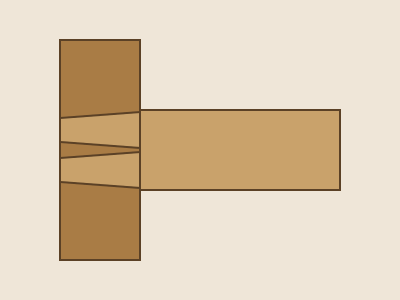 | |
| 148 | 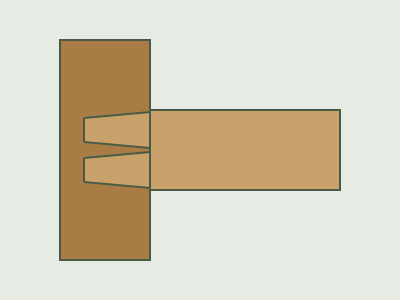 | |
| 149 | ::: | |
| 150 | | |
| 151 | ```forge | |
| 152 | :::gallery[Through and half-blind dovetails] | |
| 153 |  | |
| 154 |  | |
| 155 | ::: | |
| 156 | ``` | |
| 157 | | |
| 158 | See [[Images and files]] for uploading images. | |
| 159 | | |
| 160 | ## Album | |
| 161 | | |
| 162 | Every image in one of the wiki's folders, in the same grid as a gallery, each captioned with its file's title. New uploads to the folder appear without editing the page. | |
| 163 | | |
| 164 | ```forge | |
| 165 | ::album[Every weapon]{folder=weapons} | |
| 166 | ::album[Latest screenshots]{folder=screenshots sort=newest limit=12} | |
| 167 | ``` | |
| 168 | | |
| 169 | - `sort=newest` puts the latest uploads first; otherwise they go by name. | |
| 170 | - `limit` sets how many show (60 unless you say, at most 200); a link under the album leads to the rest. | |
| 171 | | |
| 172 | ## Screenshot | |
| 173 | | |
| 174 | An image in a small browser window, with a drop shadow and room on both sides: for screenshots of a site or an app. The label is its caption, and `url` shows in the window's address bar (as text, not a link). | |
| 175 | | |
| 176 | :::screenshot[The article editor]{url="apex.fanforge.wiki/a/k3v9qa/edit"} | |
| 177 |  | |
| 178 | ::: | |
| 179 | | |
| 180 | ```forge | |
| 181 | :::screenshot[The article editor]{url="apex.fanforge.wiki/a/k3v9qa/edit"} | |
| 182 |  | |
| 183 | ::: | |
| 184 | ``` | |
| 185 | | |
| 186 | It holds exactly one image. Leave the image's alt text empty, as here, and it uses the file's own description. | |
| 187 | | |
| 188 | ## Diagrams | |
| 189 | | |
| 190 | A code block marked `mermaid` draws a diagram: flowcharts, timelines, sequences and more. | |
| 191 | | |
| 192 | ```mermaid | |
| 193 | flowchart LR | |
| 194 | Idea --> Draft --> Review --> Published | |
| 195 | ``` | |
| 196 | | |
| 197 | ````forge | |
| 198 | ```mermaid | |
| 199 | flowchart LR | |
| 200 | Idea --> Draft --> Review --> Published | |
| 201 | ``` | |
| 202 | ```` | |
| 203 | | |
| 204 | ## Your wiki's own | |
| 205 | | |
| 206 | Wikis add components of their own: see [[Writing components]]. |